

The Stripe MCP server: what it does, how to set it up, and what it can't tell you
How the Stripe MCP server works, how to add it to Claude, Claude Code, Cursor and Codex, the full tool list, and the revenue questions it cannot answer, plus how to fix that.
By Pedro Campos

Stripe built an MCP server, and it is genuinely good. Point Claude, Cursor or Codex at it and your agent can refund a charge, mint a payment link, chase overdue invoices and look up API documentation without you touching the dashboard. If you run a SaaS on Stripe, you should probably have it connected.
But there are two different jobs hiding inside "connect my AI to Stripe", and the official server was built for one of them. One job is moving money: create this, refund that, update the other thing. The second is understanding money: what is my MRR, why did it dip in July, which cohort retains, which customers are about to churn. The Stripe MCP server is excellent at the first job and, for reasons that are structural rather than temporary, weak at the second.
This post covers both halves honestly: what the server is, how to set it up in every major client, what its tools actually do, where the write access should make you careful, and then what to add when the questions turn from operations to metrics.
What is the Stripe MCP server?
MCP (Model Context Protocol) is the open standard AI assistants use to reach outside tools. An MCP server exposes a set of typed tools; a client like Claude, Cursor or Codex connects to it and can then call those tools mid-conversation. Instead of you copying data into the chat, the agent fetches what it needs, when it needs it.
Stripe's implementation is a remote server hosted at https://mcp.stripe.com. There is nothing
to run locally and nothing to deploy: you point your client at the URL, approve an OAuth
consent screen, and the agent can operate on your Stripe account with the permissions you
granted. Sessions are visible and revocable in the Stripe Dashboard under your user settings,
which is a meaningfully better security model than pasting a secret key into a config file.
Under the hood it is broad. Rather than shipping one tool per endpoint, Stripe exposes a few meta-tools that wrap around a hundred API methods: customers, subscriptions, invoices, refunds, disputes, products, prices, payment links, coupons, payouts and more.
Setting it up
The server speaks standard MCP over HTTP, so setup is one line or one small config block in any client:
One line adds it. Then run /mcp and authenticate with OAuth in the browser.
claude mcp add --transport http stripe https://mcp.stripe.com/Desktop or web, on any paid plan.
- 1Open Settings, then Connectors, then Add custom connector.
- 2Paste https://mcp.stripe.com as the URL and save.
- 3Approve the OAuth consent screen Stripe opens, choosing the account it may read.
ChatGPT installs Stripe as a plugin rather than by URL. Plus, Pro, Business, Enterprise and Education plans.
- 1Open the plugin store and install the official Stripe plugin.
- 2Approve the OAuth consent screen Stripe opens, choosing the account it may read.
- 3Ask something ("list my open disputes") to confirm the tools respond.
Add this to ~/.cursor/mcp.json, then approve the OAuth prompt.
{
  "mcpServers": {
    "stripe": {
      "url": "https://mcp.stripe.com"
    }
  }
}
Add the server to ~/.codex/config.toml, then sign in with the second line.
[mcp_servers.stripe]
url = "https://mcp.stripe.com"

# then, in the terminal:
codex mcp login stripe
Two notes worth knowing before you approve anything:
- Prefer OAuth over an API key. Every client above supports it. If you must use a key (headless environments, connected accounts), use a restricted key scoped to what the agent actually needs, never your live secret key.
- You can audit and revoke. Authorized MCP clients appear under OAuth sessions in your Stripe user settings, and administrators can manage MCP access account-wide, separately for live mode and sandboxes.
The tools you actually get
The current tool list, from Stripe's own docs:
| Tool | What it does |
|---|---|
stripe_api_search | Finds the right Stripe API method for a task |
stripe_api_details | Gets the exact parameters that method takes |
stripe_api_read | Calls any supported GET method |
stripe_api_write | Calls the supported POST, PATCH, PUT and DELETE methods |
create_refund | Refunds a charge |
get_stripe_account_info | Reads the connected account |
search_stripe_documentation | Searches Stripe's docs and support articles |
stripe_implementation_planner | Walks you through building a Stripe integration |
stripe_report | Searches, retrieves and creates report runs |
stripe_analytics | Queries Stripe's built-in metrics and Sigma tables (private preview) |
The four stripe_api_* tools are the clever part: the agent searches for a method, reads its
parameters, then calls it. That is how one server covers customers, billing, disputes, tax,
Issuing and Treasury without blowing up the model's context window.
What it's good for
Operations. The server turns "log into the dashboard, find the thing, click through three screens" into a sentence:
That loop, find the object, act on it, confirm, is where the Stripe MCP server earns its place. Some prompts that work well, straight from a real support-and-founder workflow:
It is also quietly excellent while you are building on Stripe: search_stripe_documentation
means your coding agent cites current docs instead of hallucinating API shapes from training
data, and the implementation planner walks through integration choices with you.
A word about write access
Read the tool table again: stripe_api_write covers POST, PATCH, PUT and DELETE. This is not a
read-only integration. An agent connected to it can cancel subscriptions, void invoices, delete
coupons and issue refunds on your live account.
Stripe says this themselves in the docs: enable human confirmation of tool calls, and be careful running the Stripe MCP alongside other servers, because a prompt-injection attack in one tool's output can try to steer the agent into calling another. Practical hygiene:
- Keep tool confirmation on for anything that writes. The one extra click is the whole safety model.
- Point agents at a sandbox while you are experimenting. MCP access is configured separately for live mode and sandboxes.
- If a workflow only ever reads, authenticate that client with a restricted key that cannot write, and the blast radius goes to zero.
None of this is a reason not to use the server. It is a reason to know which of your connected agents can move money, the same way you would with a human on your team.
The questions it can't answer
Now the second job. Connect the Stripe MCP server and ask the obvious founder question:
"What was my net MRR growth in July, split into new business, expansion, contraction and churn?"
The agent will try. It will page through stripe_api_read calls, list subscriptions and
invoices, and assemble a number. The number will be wrong, and it will be wrong in a way you
cannot see, because MRR is not a field in the Stripe API. It is an opinionated computation.
Raw subscription objects do not answer questions like:
- How does a $1,188 annual plan count in a monthly number?
- Does the customer on a trial count? The one who is
past_due? Cancelled-at-period-end? - What does a mid-month upgrade with proration contribute?
- Is that 50%-off-for-3-months coupon revenue or not?
- When a customer moves from $99 to $79, which part is contraction and which is churn risk?
Every one of those has a right answer, and the right answers have to be applied consistently across your whole history to produce a number you can trust. That is a ledger, not an API call. (We wrote up the full set of decisions in What is MRR?, and the short version lives in the glossary.)
To be fair about where Stripe is heading: the stripe_analytics tool in private preview can
query Stripe's own Billing metrics and Sigma tables, and it will get better. But it is Stripe's
metric definitions on Stripe's data for one Stripe account, an aggregate you query rather than
a movement ledger you can interrogate. The gap between "here is a chart of MRR" and "here is
why, customer by customer, movement by movement" stays open. And if part of your revenue
lives in Paddle, Creem or anywhere else, no Stripe tool will ever see it.
Getting real metrics into the same agent
The fix is not to replace the Stripe MCP server. It is to add a second connector that does the computing before the agent ever asks. Kometrics ingests your billing data, normalizes it into a movement ledger (every dollar of new business, expansion, contraction, churn and reactivation, per customer, per month), and exposes that over MCP as read-only tools: metric series, movement breakdowns, customer detail, cohort retention, LTV, past-due and renewals.
Same question, asked through the Kometrics connector:
That answer is not the model doing arithmetic on raw API objects. Each figure comes from the same ledger the dashboard renders, so the agent's number and your reports agree, and every answer links back to the report page it came from:
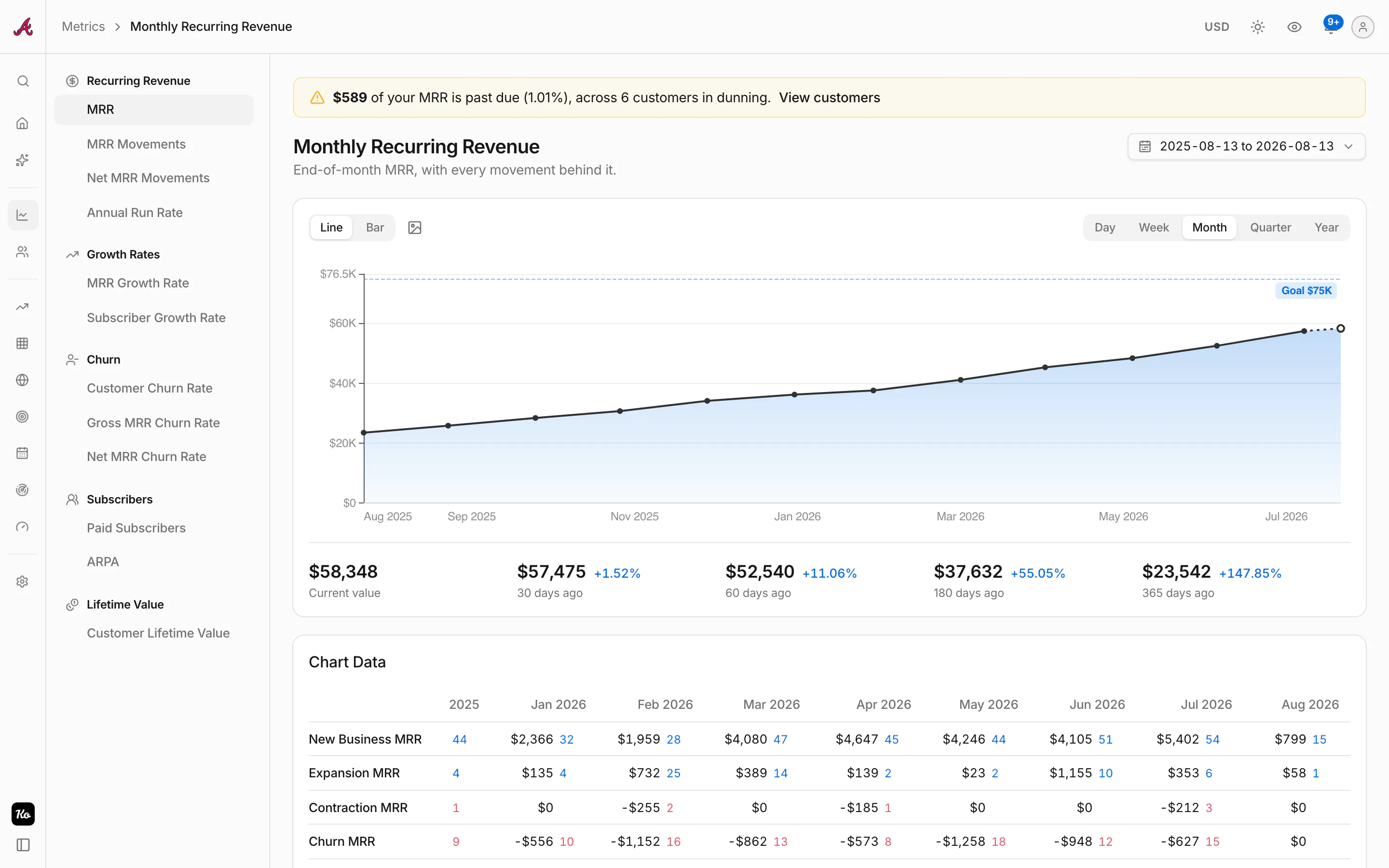
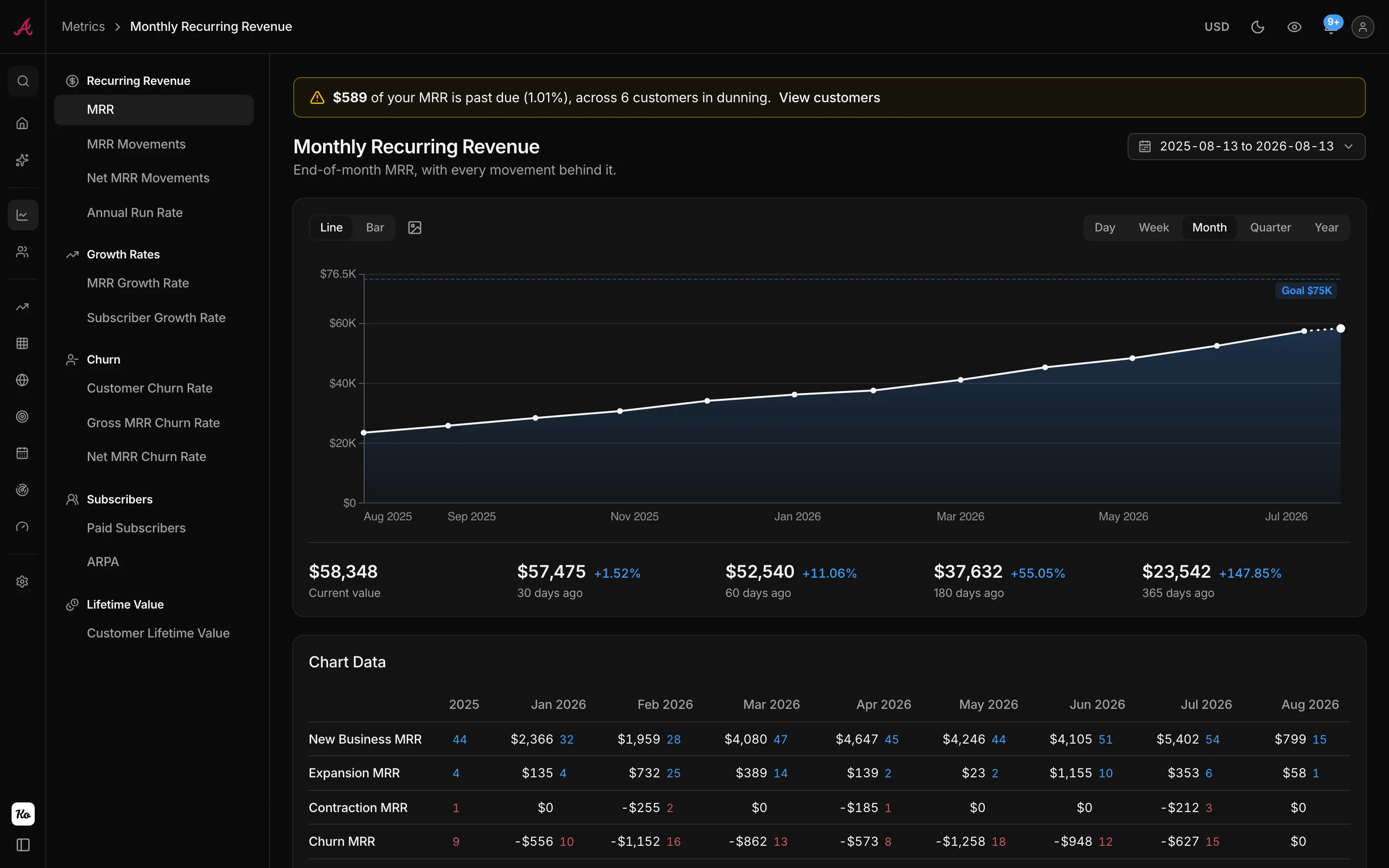
Setup is the same one-liner shape, with OAuth and no key to paste:
Then run /mcp and choose Authenticate: the browser opens once for the approval screen, where you pick the workspace.
claude mcp add --transport http kometrics https://app.kometrics.com/mcpDesktop or web. The connector URL is https://app.kometrics.com/mcp.
- 1Open Settings, then Connectors, then Add custom connector.
- 2Paste the connector URL and save.
- 3Approve it on the Kometrics screen, choosing the workspace it reads.
The connector URL is https://app.kometrics.com/mcp, with OAuth as the authentication.
- 1Turn on Developer mode under Settings, then Connectors.
- 2Add a connector with the connector URL, and OAuth as the authentication.
- 3Approve it on the Kometrics screen, choosing the workspace it reads.
The second line opens the browser for the approval screen.
codex mcp add kometrics --url https://app.kometrics.com/mcp
codex mcp login kometrics
And the questions that were unanswerable a section ago become the everyday ones:
One deliberate design difference: the Kometrics connector has no write tools at all. It cannot refund, cancel or edit anything, which means it is one connector you never have to think about in the prompt-injection threat model.
Keep both connected
The honest comparison, question by question:
| You ask | Stripe MCP server | Kometrics connector |
|---|---|---|
| "Refund acme.io's last charge" | Yes | No, read only |
| "Create a payment link for the annual plan" | Yes | No, read only |
| "Look up how proration invoicing works" | Yes, docs search | No |
| "What is my MRR today?" | Preview, Stripe's definition | Yes, from the ledger |
| "Split July into new, expansion, contraction and churn" | No | Yes |
| "Which customers churned last quarter, and what did they carry?" | No | Yes |
| "How does the January signup cohort retain?" | No | Yes |
| "What is our LTV, and how is it trending?" | No | Yes |
They are complements, not competitors: one moves money, the other explains it. Connect the Stripe MCP server for operations, add Kometrics in Claude, ChatGPT or any MCP client for the metrics, and your agent covers both jobs. Kometrics is free under $1,000 MRR, so trying the pairing costs nothing.
FAQ
Is the Stripe MCP server free?
The server itself costs nothing beyond your Stripe account. The stripe_analytics preview
builds on Sigma, which has its own availability, and using the ChatGPT plugin requires a paid
ChatGPT plan.
Is the Stripe MCP server read-only?
No. stripe_api_write can create, update and delete across the supported API methods,
including refunds and subscription cancellations. If you want read-only, authenticate with a
restricted API key that only grants read permissions.
Does it work with ChatGPT?
Yes: ChatGPT Plus, Pro, Business, Enterprise and Education accounts can install Stripe's
plugin, and the Codex CLI takes the server as a standard MCP entry in config.toml.
Can it calculate my MRR, churn or LTV?
Not reliably. The agent can read raw subscriptions and estimate, and the analytics preview can surface Stripe's own aggregates, but there is no normalized subscription ledger behind it. For metrics an agent can reason over (movements, cohorts, LTV, per-customer histories), use a subscription analytics connector such as Kometrics alongside it.
Know your revenue. Trust the metrics.
Connect Stripe and get every SaaS metric computed from your real billing history. Free under $1,000 MRR.
Start freeKeep reading

Gross churn vs net churn: the leak, and what covers it
Gross MRR churn measures what you lost; net churn subtracts the expansion that covered it. Formulas, a worked example, negative churn, and why quoting only one of them misleads.

Paddle vs Stripe for SaaS: merchant of record or payments platform
Paddle and Stripe are different species: one becomes the seller and handles global tax for 5% + 50¢, the other gives you the best payments infrastructure and leaves compliance to you. The real comparison, with the math.

Bookings vs revenue: what you sold, what you earned, and what hit the bank
Bookings measure commitments, revenue measures delivery, and cash measures timing. The differences explained with one annual contract, plus where MRR and ARR fit in the picture.